Professional Headshots From a Selfie
Upload a clear selfie and get a polished, studio-style headshot for LinkedIn, your resume, or your company website — in about a minute, without booking a photographer.
- Looks like you, not a stranger
- Corporate, outdoor and creative styles
- Pay per image, no subscription
Create Your AI Headshot
Upload one selfie, choose a headshot style, then generate.
Headshot style
Pick the style that fits your profession.
Extra changes (optional)
Describe outfits, colors, or details you want. The scene above is applied automatically.
Transform the uploaded selfie into a photorealistic professional headshot. Use the uploaded photo as the identity reference. Keep every person's face, facial features, skin tone, hairstyle, age, and body proportions recognizable and natural. Do not add, remove, or swap people, and do not change anyone's ethnicity or age. Frame head and shoulders, with the person looking at the camera, a natural confident expression, realistic skin texture without heavy retouching, sharp focus on the eyes, and professional lighting. Dress the person in a well-fitted navy or charcoal blazer over a crisp shirt, with a neutral light gray studio backdrop and soft even lighting.
Headshot Styles
Choose the look that fits where you’ll use it, then upload your selfie.

Navy blazer, light gray backdrop and soft, even studio light.

A modern office window with soft daylight and a blurred city.

Approachable, warm and natural — great for realtors and coaches.
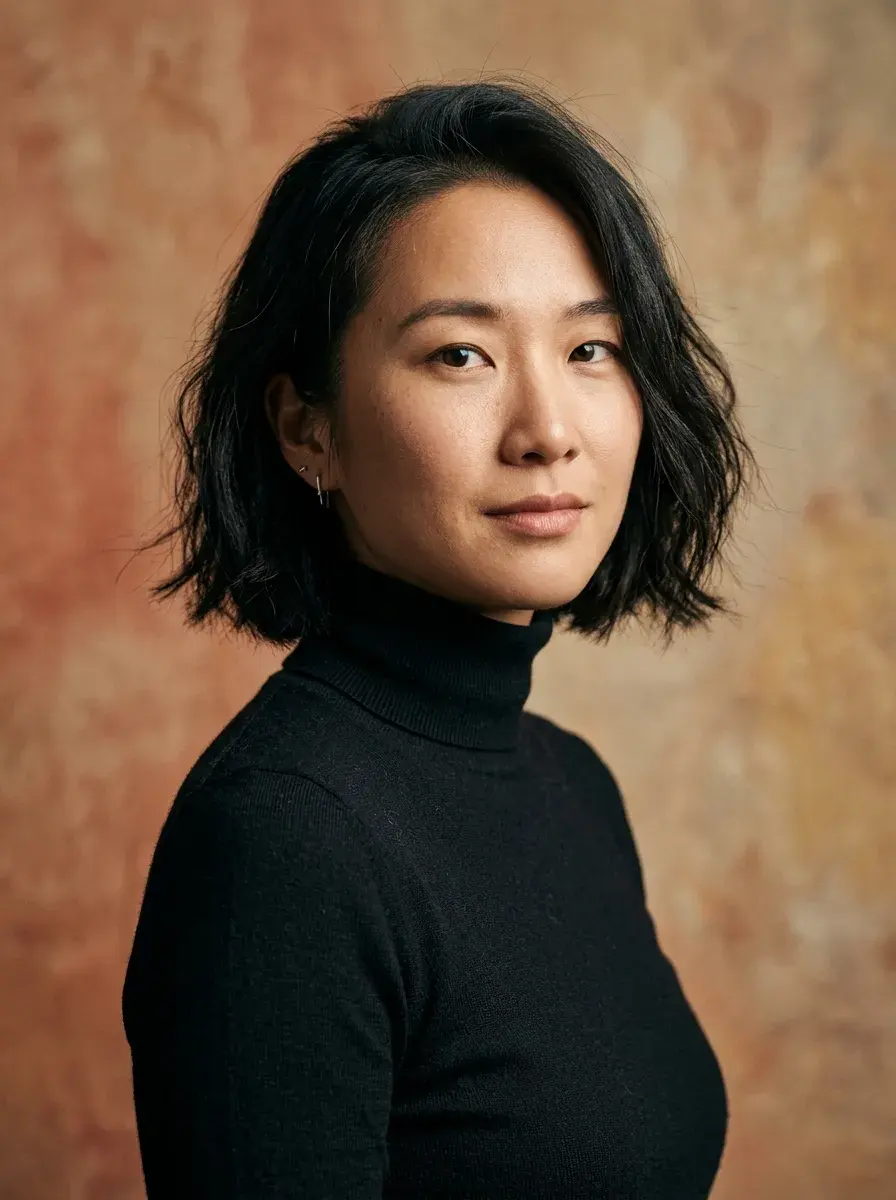
Black turtleneck, textured backdrop and dramatic soft light.

Timeless business headshot on a warm gray backdrop.

White coat, bright clinic background and a trustworthy look.
Holiday Pack: $9.90 for about 10 images
One-time purchase. No subscription, no auto-renewal. Credits work for every look on Magggic and last 12 months.
40 credits — $9.90
- About 10 standard images, or fewer at 2K/4K
- Failed images are refunded automatically
- Valid for 12 months
Where People Use Their Headshots
One selfie, a professional photo for every profile.
LinkedIn profile
A clean, professional profile photo that helps your profile get noticed.
Resumes and job applications
A polished photo for resumes, portfolios, and application portals.
Company and team pages
Consistent headshots for websites, email signatures and pitch decks.
Realtors, coaches and doctors
Approachable, trustworthy photos for listings, bios and booking pages.
Three Steps, About a Minute
- 01
Upload a clear photo
Choose a well-lit photo where you faces the camera. Phone photos work well.
- 02
Pick a look
Select a preset scene, or describe extra changes such as outfit colors, background, or mood.
- 03
Generate and download
Your image is ready in about a minute. Download it, generate another version, or try a different look.
Tips for a Better AI Headshot
Face the camera
Use a front-facing selfie at eye level, without sunglasses or a hat.
Even light
Stand facing a window; avoid harsh overhead light and strong shadows.
Keep it recent
A recent photo keeps your headshot honest and recognizable.
Name your outfit
Add “charcoal suit, no tie” or “light blue shirt” to match your industry.
Frequently Asked Questions
Will the AI headshot look like me?
Your selfie is used as the identity reference, and the generator is told to keep your face, features, skin tone and hairstyle natural without heavy retouching. A sharp, front-facing selfie gives the best likeness.
Can I use an AI headshot on LinkedIn?
Yes, many people do. Choose a style that looks like you on a good day, and pick 1:1 or 4:5 for profile photos.
How many selfies do I need?
Just one. Upload a single clear selfie and generate as many styles as you like.
How long does it take?
Most headshots are ready in about a minute — no training step and no waiting hours.
Is it free to try?
New accounts receive free starter credits, enough to try a few images at standard resolution. After that, the Holiday Pack is $9.90 for 40 credits (about 10 standard images) — a one-time purchase with no subscription. Failed generations are refunded automatically.
What happens to the photo I upload?
Your photo is only used to create your images. Generated images stay private in your account unless you choose to publish them, and you can delete them at any time.
Get a Professional Headshot in a Minute
Upload a selfie, choose a style, and download a headshot ready for LinkedIn.